



How SaneBox Helps Freelancers Take Back Their Inbox


Created in partnership with SaneBox, this sponsored blog post examines how freelancers can manage email overload more effectively. It highlights intelligent inbox management capabilities that help organize messages, prioritize essential communication, and create a more focused working experience.
SANEBOX · PRODUCT REVIEW
An AI email tool that gives you less to deal with — not more to manage.
For freelancers juggling multiple clients, deadlines, and communication channels at once, email isn’t just admin — it’s where the work lives. Projects get managed, relationships get maintained, and opportunities get won or lost, all in the inbox. So when that inbox fills with newsletters, promotions, and junk notifications, the messages that actually matter get buried. SaneBox is built to fix exactly that.
SaneBox is an AI-powered email tool that automatically organizes your inbox so you can focus on the work that matters most. It doesn’t replace your email app or ask you to learn a new system — it works quietly inside the one you already use.

Why Better Email Management Is a Must for Freelancers
For most freelancers, time is money. Hours lost sorting through a crowded inbox to find the few useful messages is time not spent on billable work — and it adds stress on top. Worse, a missed client email or a delayed reply can quietly cost you a project.
SaneBox cuts inbox clutter while letting you keep your existing email provider. It integrates seamlessly with all major services, including Gmail, Outlook, and Apple Mail, so it slots into your day without changing how you already work.
| The kind of AI that matters here
Plenty of tools now promise AI that writes your replies and acts on your behalf. SaneBox takes the opposite approach: its AI works to give you less to deal with, not more to supervise. It decides what deserves your attention and quietly moves the rest aside — no prompts, no drafts to approve, and no robot to babysit. |
What SaneBox Does
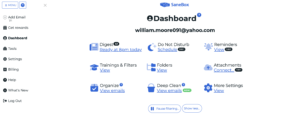
At its core is intelligent, automatic sorting. You don’t define rules or build filters by hand — SaneBox learns which emails matter to you and routes the rest out of the way on its own. A few of the features freelancers lean on most:
SaneLater — Moves less important email into a separate folder, keeping your main inbox clear of clutter and distraction.
Daily Digest — Sends one summary of your non-urgent email, so you skim a single report instead of opening every promotion.
SaneReminders — Nudges you to follow up when an email goes unanswered, so important conversations don’t slip through the cracks.
SaneBlackHole — Removes an unwanted sender for good with a single drag — you never hear from them again.
Snooze — Hides an email until you’re ready to deal with it — especially handy when you’re running several projects at once.
How It Improves Focus and Productivity
Freelancers move constantly between deep work, client meetings, and admin. A steady stream of email notifications breaks that concentration and chips away at efficiency. By filtering distractions automatically, SaneBox helps you stay on the high-priority work — less time monitoring the inbox, more time actually doing the work and serving clients.
Works With the Email You Already Use
SaneBox runs on top of your current email account — no switching clients, no new systems to set up. For independent professionals who want a solution that doesn’t disrupt an established workflow, that flexibility is a big part of the appeal. It also reads only the headers and metadata of your mail, not the contents of your messages, so you get intelligent sorting without handing over your private conversations.
SaneBox Pricing
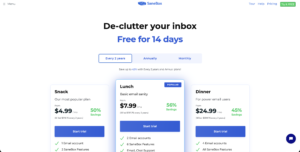
SaneBox offers three plans to match different needs, based on how many features you want and how many email accounts you connect. Every plan starts with a 14-day free trial, and annual or biyearly billing brings the cost down further.
| Revised Plan | Price (monthly) | Email accounts | Features |
| Snack | $7 / mo | 1 account | Choose 2 features |
| Lunch | $12 / mo | 2 accounts | 6 features |
| Dinner | $36 / mo | 4 accounts | All features |
Monthly pricing shown. Annual and biyearly billing lower the effective monthly cost. All plans include a 14-day free trial — no credit card required to start.
What SaneBox Users Say
Professionals tend to love SaneBox because it quietly improves inbox organization without a complicated setup. In reviews, the benefits users cite most often are the same two: time saved and less inbox stress. They also consistently point to how well it works with the email systems they already have, while keeping the experience simple.
The Bottom Line
Freelancers need tools that help them stay organized and productive without adding overhead. SaneBox is smart email management that fits the workflow you already have. With dependable automation, features you can tailor to how you work, and compatibility across all major email services, it lets independent professionals spend less time sorting email — and more time growing their business.
| Try SaneBox free for 14 days
See what your inbox looks like with the noise gone. Start your free trial — no credit card required. |
Disclosure: This article is published by a SaneBox affiliate. If you sign up through links in this article, the author may receive compensation from SaneBox.